See what you earned, who still owes you, and where your money went. In one Google Sheet.
Add each invoice and expense as one row. The sheet shows your income for the month, puts late payers at the top, and keeps your TDS and tax numbers ready for your CA.
✓ Instant access✓ Phone and laptop✓ 7-day refund
Your money, sorted without formulas
Type one row for each invoice and expense. Everything below fills itself in.
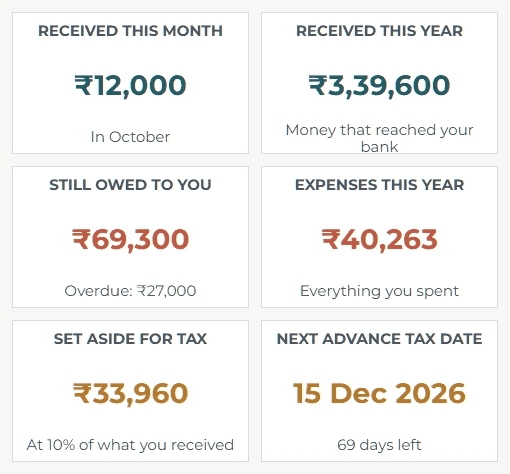
Your income for the month, on 1 screen
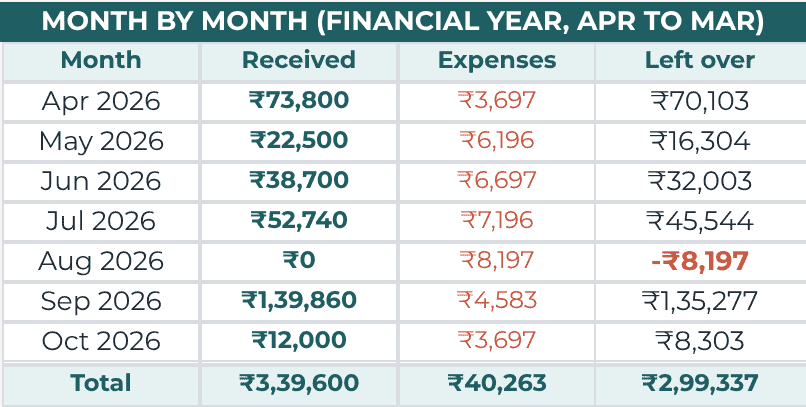
Open the Dashboard to see what came in, what went out and what was left. Every month of the year sits side by side.
Every late payer in 1 list
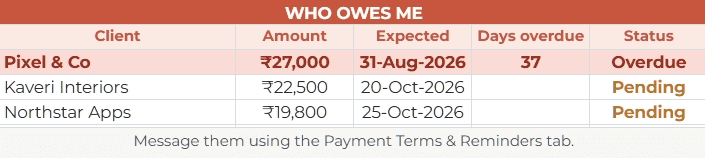
Unpaid invoices move to the top, with the days overdue counted. Need to chase a payment? Copy one of the 3 reminder messages in the sheet and send it on WhatsApp or email.
Know which cost takes the biggest share
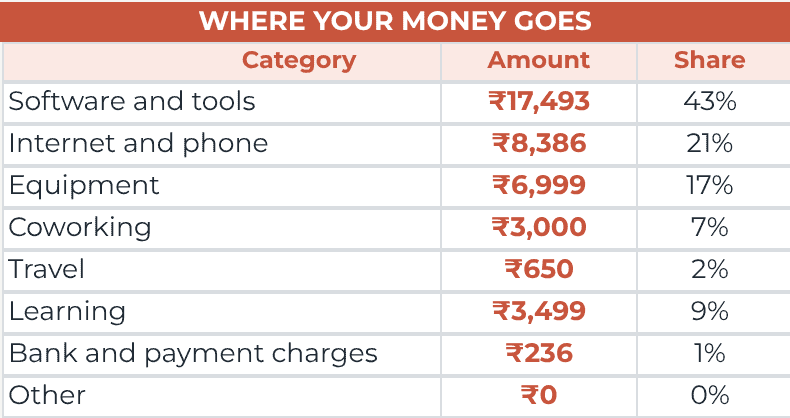
Pick a category for each expense, like software or internet. The sheet adds them up and shows the share of each, so you can see what to cut.
And it even does this
Rushing to find tax money at the last minute
TDS and tax dates, sorted for you
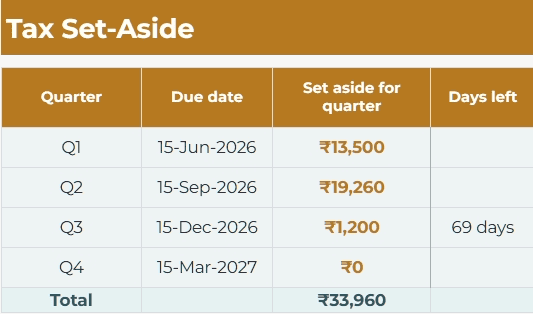
TDS gets its own column, so your totals match your bank. The sheet sets money aside for all 4 advance tax dates. At year end, 1 page goes to your CA.
Everything a freelancer needs to track money
The tracker
- Dashboard: this month, month by month, who owes you
- Income: one row per invoice, late ones turn red
- Expenses: pick a category, see where money goes
- Year Summary: one page for your CA
- Tax Set-Aside: money for the 4 advance tax dates, with days left
- Start Here and Settings: add your name and pick your tax %, once
Bonuses Included
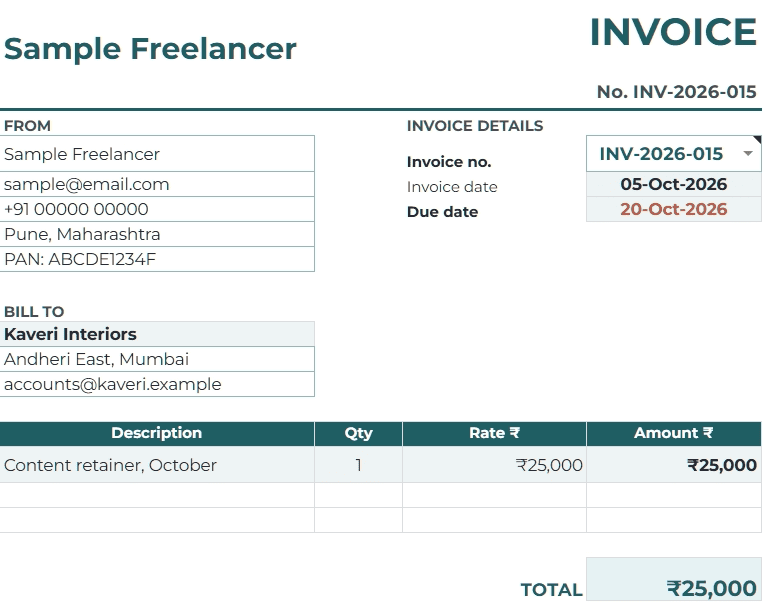
- Invoice: fills itself in, saves as a PDF, turns into a receipt when paid
- Payment Terms & Reminders: 4 terms for proposals, 3 messages for late clients
- Monthly Routine: a 15-minute money check in 6 steps
- Habit Tracker: daily habits, with a monthly score
Help to get started
- Video guide: every tab, step by step, in 8 minutes
- Sample copy: a full example year to learn from
- Email help: reply within 24 hours
- 7-day refund: not for you? Full ₹199 back
3 steps, and the sheet does the rest
- 1
Make your copy
After you pay, tap the button and Google saves your own copy in your Drive. Only you can see it.
- 2
Add each invoice and expense
One row each: date, client or item, and amount. When a client pays, add the date the money arrived.
- 3
Open the Dashboard
It fills itself in, and so does every other tab, from your very first entry.
Built for freelancers who get paid by clients
I’m Hari, a freelance writer. Some months three payments land in one week, and some months nothing arrives until the 28th.
My notes app couldn’t tell me how much I really earned that month, or who still owed me. So I built this sheet. Now I open one tab and the answers are there.
A great fit if you:
- Invoice clients and get paid by UPI, bank transfer or a platform
- Want to see what you earned each month without adding it up
- Lose track of small costs like software and internet
- Often get less than you invoiced, after TDS or platform fees
- Have never written a formula and don’t plan to
Not the right fit if you:
- Need GST returns or full bookkeeping
- Need an Excel file (this is for Google Sheets)
- Want it to work out your exact tax (your CA does that)
One payment. Yours to keep.
Freelancer Income & Expense Tracker
₹199
One-time payment.
- The tracker: 7 tabs in Google Sheets
- A sample copy with a full example year
- 4 bonuses: Invoice, Payment Terms & Reminders, Monthly Routine, Habit Tracker
- 8-minute video guide
- Email help, reply within 24 hours
Not for you? Email me within 7 days and I’ll refund the full ₹199.
Secure payment by Razorpay: UPI, cards and netbanking.
Questions before you buy
How do I get it after paying?
Straight away. After you pay, you land on a page with the button to make your copy, plus the video guide. Bookmark it. If you lose the links, email me and I’ll send them again.
Does it work on my phone?
Yes. Open it in the free Google Sheets app on Android or iPhone. Logging a payment is easy on a phone. The Dashboard is easier to read on a laptop.
Do I need to know formulas?
No. You only type dates, names and amounts. Every total fills itself in.
Is it an Excel file?
No. It’s built for Google Sheets, which is free with any Google account.
I get paid in dollars. Will it work?
Yes. Type the rupees that reached your bank, and note the dollar amount in the note column.
Does it handle TDS?
Yes. Every invoice has a TDS column and a fees column, and the Year Summary adds up your TDS for the year.
Does it calculate my tax?
No, on purpose. It sets money aside using a percentage you choose and shows the next advance tax date. Your CA works out the actual tax.
Do I need to pay advance tax?
Usually yes, if your tax for the year after TDS comes to ₹10,000 or more. The due dates are 15 June, 15 September, 15 December and 15 March. Some freelancers can pay it all by 15 March, so check with your CA. (Checked on incometaxindia.gov.in, 7 Oct 2026.)
What if it’s not for me?
Email hari@harisundar.com within 7 days of buying and tell me what didn’t work. I’ll refund the full ₹199.
Know your money by the end of this month
Start with your next invoice. Add expenses as they happen. The Dashboard does the adding up for you.
Get the tracker for ₹199One-time payment.Instant access.7-day refund.